STEP 01
Capture the work
Notes, recorded time and billing status stay connected to the client matter.
Mitigate Your Risk with Mitirisk™
Includes:
MitiRisk™ Law Firm Management Software
SignalStream™ Life-Event Driven Marketing

From selecting a legal service to final attorney approval - and now from litigation matter notes to payment - MitiRisk™ brings the work together in a secure, practical workflow.
Schedule a DemoWe'll walk through the transactional and litigation workflows and discuss how they fit your practice.
Schedule a DemoA law firm grows when it can serve more paying clients without adding the same amount of administrative work. MitiRisk connects upfront intake and payment, automated document preparation, attorney review, and litigation billing - so your team can focus on legal work.
Enter your firm's own assumptions.
Illustration only, not a projection or guarantee. Contribution is before fixed overhead, platform and onboarding costs, taxes, and other expenses. Extra work requires client demand and sufficient professional capacity.
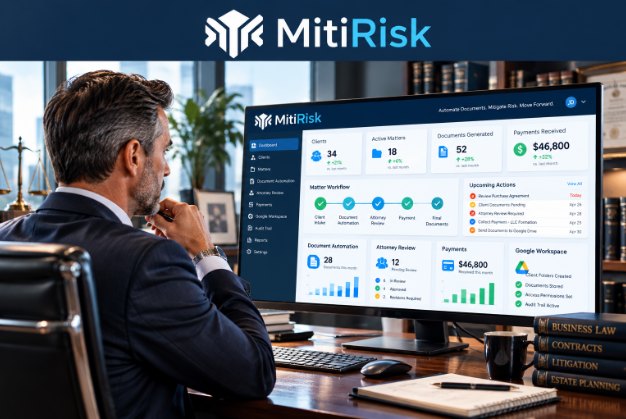
Clients can click on the link in their respective marketing approach, select and pay for legal services through guided intake. For established clients, the attorney can instead create the account, choose one or more documents, and select upfront payment, invoicing, or pro bono service. MitiRisk then delivers the firm's templates, the client fills in the variables and requests Attorney Review and e-signature or print for signature, depending on state requirements.
Client, after clicking the link sent by their attorney or in their marketing material, chooses legal documents.
Self-service clients pay upfront; attorneys may choose invoice or pro bono for concierge clients.
Firm templates populate automatically and are deliverable to a shared folder.
Attorney approves before either e-signature or client print for signature (depending on state requirements).
Completed files stay organized and are unalterable but can be printed on demand.
When a trusted client needs a document but prefers the attorney enter it for them, the attorney creates the client account, selects the necessary transactional instrument or instruments, and chooses how the engagement will be billed.
An attorney can record matter notes without switching between disconnected tools - and keep the billing information with the work.

Notes, recorded time and billing status stay connected to the client matter.
The firm Director selects a date range or client, creates an invoice for one client or generates all client invoices for the selected date, on demand.
Invoices show pertinent details and total due. Each is emailed and posted to the client's message board with a direct Stripe payment link.
The Director can create individual invoices or monthly batches without manually assembling each statement. Clients receive the same invoice by email and on their message board, with a clear path to payment.
MitiRisk provisions client-specific folders in your firm's Google Drive and organizes the document workflow around them. Clients work with the files they are permitted to access while attorneys review and approve documents before e-signature and closure.
Law firms handle sensitive information. MitiRisk combines controlled workflows and firm-managed Google Workspace resources to reduce unnecessary exposure while keeping attorneys in control.
Where a workflow step is stateless, it processes a request without relying on a permanent session copy of the document. This does not mean the entire platform stores no data: operational records and structured JSON workflow data can persist as needed.
Firm-controlled Google Drive folders benefit from Google's encryption in transit and at rest, access-management options and audit capabilities, subject to the firm's configuration, subscription and policies.
Client, attorney, Director and administrator roles are designed to limit access to the appropriate records and actions. Secure permissions and multifactor authentication should be configured and maintained.
Rules-based document preparation is routed to a qualified attorney for review and approval before e-signature, helping reduce the risk of unchecked document errors.
Workflow and access logging support oversight of intake, assignments, reviews and completion. Retention, monitoring, permissions and incident response remain essential operational responsibilities.
Clients use Stripe for transactional payments or to pay litigation invoices. Payment links help keep fee collection organized without turning the legal document workflow into a payment-card storage system.
Security clarification: “Stateless” describes certain processing behavior, not an absolute zero-retention promise. Use of Google infrastructure does not itself mean MitiRisk is independently SOC 2 certified, HIPAA compliant, or the “highest security available” in any audited comparison. Security outcomes depend on implementation and configuration.
Spend less time moving data between systems and more time applying legal judgment.
Automated preparation supports the work; a qualified attorney remains responsible for final review.
Your firm uses its own Google Workspace folders while MitiRisk coordinates intake, review and completion.
Collect payment upfront, choose concierge invoicing or pro bono service, and send litigation invoices with Stripe links.
SignalStream™ helps firms organize life-event marketing campaigns, targeted outreach and follow-ups based on their practice areas.


Separate service: SignalStream™ is priced independently of the MitiRisk subscription. Explore SignalStream marketing →
Compare MitiRisk with legal practice management, CRM and document-service platforms such as Clio, MyCase, PracticePanther, Lawmatics, Law Ruler, LegalZoom and Rocket Lawyer. See how guided legal intake, attorney-reviewed document automation, Concierge Legal Service, litigation billing, Google Workspace and separately priced SignalStream marketing fit together.
| Feature / Capability | MitiRisk Platform | Traditional Practice Software (Clio, MyCase, PracticePanther) |
CRM & Intake Tools (Lawmatics, Law Ruler) |
DIY / Direct Document Sites (Rocket Lawyer, LegalZoom) |
|---|---|---|---|---|
| Core Business Model | Client-initiated transactions, attorney-led Concierge Legal Service, plus litigation matter notes, time tracking and invoicing | Practice and case management, timekeeping and billing | Lead intake, CRM and marketing follow-up | Self-service legal forms and related legal services |
| Revenue Realization | Client intake supports upfront payment; attorney-initiated concierge engagements also offer invoice later or pro bono. Litigation invoices include Stripe payment links. | Billing, invoicing and online payments; setup varies by product | Lead conversion and intake; payment features vary | Consumer subscriptions or fees for selected services |
| Concierge Legal Service - Existing Clients | Attorney creates the client account, selects one or more transactional documents and chooses pay upfront, invoice later or pro bono. Supports document work without requiring immediate client checkout. | Staff can create matters and arrange billing; integrated document selection and payment controls vary by product and configuration. | Staff-led client intake and payment workflows vary by vendor; document automation and pro bono handling may require additional tools. | Generally oriented to consumer-initiated document selection and checkout, not a firm's existing-client concierge workflow. |
| Litigation Matter Notes & Billable Time | Type notes, use voice-to-text or upload a voice recording. Record start and stop times and flag each entry for billing. | Matter notes, timers and billable time are common; audio and dictation options vary by provider. | Primarily lead intake and CRM; matter-note and timekeeping capabilities vary by product or integration. | Typically focused on legal forms and purchased services, rather than law-firm matter timekeeping. |
| Invoice Generation | Director-generated invoices on demand: individual client invoices or invoices for all clients for a selected month. | Individual and batch billing are available in many practice platforms; workflows and configuration vary. | Some payment or invoicing tools are offered directly or through integrations, depending on the platform. | Consumer-facing charges and subscriptions; not typically a law-firm billable-matter invoicing system. |
| Invoice Delivery & Payment | Itemized invoices show pertinent matter details and total due, are emailed and posted to the client message board, and include a direct Stripe payment link. | Online invoices, client portals and electronic payments are common, with provider-specific integrations. | Client communications and payment-link options vary by vendor and connected services. | Checkout for forms or services, rather than ongoing firm-to-client matter billing. |
| Quality & Risk Control | Firm-template automation with human-in-the-loop attorney review | Attorney-managed drafting and review, with product-specific tools | Intake and communication workflows; legal review remains with the firm | Legal review and professional services vary by product and plan |
| Data Security & Privacy | Firm-controlled Google Workspace files, access permissions, audit trails and stateless processing where applicable | Cloud-hosted case data and security controls that vary by vendor | Cloud-hosted prospect data with vendor-specific controls | Cloud-based accounts and documents, with product-specific retention policies |
| Client Intake Flow | Client-guided intake or attorney-created client account with selected document(s) and a choice of payment arrangement, followed by completion and attorney approval | Firm-managed intake and client communications, with varying automation | Online intake forms, CRM workflows and follow-ups | Self-directed forms and optional support services |
| Lead Pipeline Engine | SignalStream™ life-event targeting and campaigns (separately priced) | Integrations, referrals or third-party marketing; varies by product | Marketing and lead-automation features are often a core focus | Consumer-facing acquisition and online search traffic |
On mobile, swipe sideways to view all columns.
Explore the full legal software comparison guide
This is a high-level comparison of typical product categories, not a feature-by-feature audit or security certification of named providers. Features, pricing, attorney services and retention policies vary by product and plan. MitiRisk retains operational and structured workflow records; stateless processing does not mean zero data storage.